
Essential cookies
These cookies are necessary for you to use the website and its functions. They cannot be turned off.
Rules, practical service guides and answers to questions from work. Open the relevant guide before a booking or return to it while providing care.
Start with registrationChoose a situation or service. Each guide has its own link that you can send to a sitter.
No results. Try another word or clear the search.
Register after completing selection and receiving approval from Alvis. Open the sitter registration form. If you already have an account, sign in instead of creating another one.
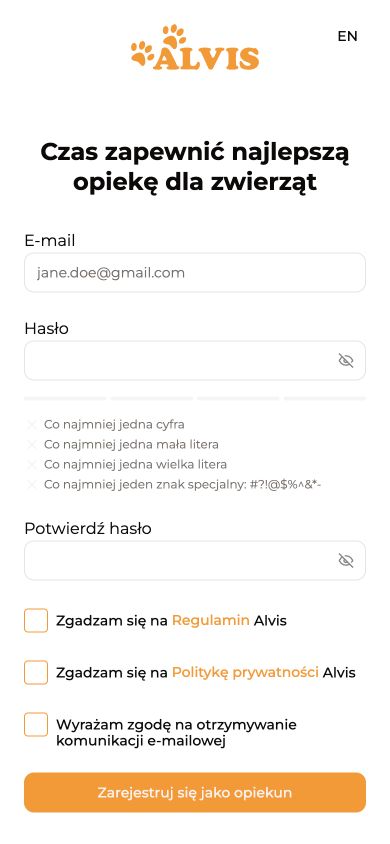
Use the link below to create your sitter account. Before submitting, check that the button says “Sign up as a guardian” (“Zarejestruj się jako opiekun”). The registration link on the login page is for pet owners. If you see “Sign up as a pet owner”, come back and use the link below.
Open sitter registrationOpen the email containing the verification code and follow its confirmation instructions. If it has not arrived, check spam and the address you entered. Do not create multiple accounts to resolve one error: contact your coordinator if you need help. Never share your password or sign-in code.
Arrange and receive payment for bookings obtained through Alvis on the platform, including repeat services for the same client. If the client proposes an arrangement outside the system, inform Alvis. Confirmed conditions, changes and service completion must remain recorded in the booking.
New bookings are posted in city chats. Confirmation arrives by email and appears in Schedule. Check the panel yourself because not every status change produces a separate notification.
Alvis is an intermediary. You provide the service to the client in your own name and are responsible for following the booking and the terms.
Before applying, read the entire booking and compare the dates, duration, responsibilities and pet’s needs with your availability, experience and home conditions.
You are committing to the full agreed scope of care. At the introductory meeting, clarify missing information, where supplies are kept and how keys will be handed over.
Care follows the agreed client instructions: routine, feeding, walks, household tasks and the pet’s limitations.
If instructions are incomplete, unclear or contradictory, clarify them with the client before carrying out the relevant action. If you cannot reach the client, contact the coordinator. Do not guess or change agreements on your own.
During the service, combine completing tasks with paying attention to the pet. Observe their condition, keep things clean and maintain the agreed routine. Care time includes observation and calm company, not just feeding or cleaning; finishing the task list does not shorten the booked duration.
Working independently means following clear instructions carefully. Agree changes to timing, diet, medication, the animals in your care or the scope of care with the client; also agree booking-condition changes with Alvis so they are recorded in the system.
If you cannot carry out an action safely, stop it and contact the client; if they are unavailable, contact the coordinator. Explain what happened and what you observe, without guessing. Emergency assistance is covered in the safety section.
We recommend Trotto to all caregivers. Install it and make a test recording before your first service to check how it works on your phone.
The tracker is required for every service. Only the period for which it must run differs.
If the tracker fails, take a screenshot, record the actual start and end times and explain the issue in the report immediately.
After a standalone walk or visit, send the report as soon as possible, within one hour of finishing. For boarding and live-in care, complete two reports a day — around 10:00 and 18:00 — covering the full period since the previous report, including time at home and walks. Add photos and all tracker records for that period.
The report completes the care provided and helps the owner understand the whole period.
Describe actual tasks and observations, attach current photos and an accurate tracker record. Do not replace missed tasks with general phrases, old photos or altered times. Report problems that need a decision now immediately, without waiting for the scheduled report.
A cat-visit report includes completed tasks and observations, photos of bowls with food and fresh water, the clean litter tray and the pet if a photo can be taken without distress, plus the visit tracker record.
If the cat is hiding, do not pull them out for a photo: show the care completed and explain the situation. Do not substitute older photos for current ones.
Once you accept a morning walk, the owner can go to bed knowing you’ll be there to take their dog out. Before applying, check how long it will take you to get there. Allow some extra time and look up another route in case your usual one falls through.
A coordinator does not replace the owner or a veterinarian. When life is at risk, the animal needs help first.
These rules apply to every Alvis service. The client entrusts you with their pet, keys and access to their home.
Theft, violence and fraud are unacceptable. If a crime is suspected, Alvis reports the matter to the competent authorities and provides necessary information, including the sitter’s identification details, in accordance with the law.
Arrange and receive payment for bookings obtained through Alvis on the platform, including repeat services for the same client. If the client proposes an arrangement outside the system, inform Alvis. Confirmed conditions, changes and service completion must remain recorded in the booking.
Most sitters using Alvis operate under działalność nierejestrowana — activity without registering a business. This describes a commonly used arrangement, not confirmation that you qualify for it. You provide services in your own name; Alvis acts as an intermediary.
Before accepting a booking, independently check that you may legally provide services in Poland and meet the current conditions for your chosen form of activity, including działalność nierejestrowana. For foreign nationals, this also includes residence status and any required permissions.
You are responsible for your own revenue records, tax reporting and other legal obligations that apply to you. Not registering a business does not remove all formalities. Check current requirements on Biznes.gov.pl and podatki.gov.pl; consult an accountant or lawyer if you are unsure.
A coordinator does not replace the owner or a veterinarian. When life is at risk, the animal needs help first.
For loss of consciousness, breathing difficulty, seizures, severe bleeding or rapidly increasing swelling, contact the owner and the nearest veterinary clinic immediately. If the owner does not answer, do not delay urgent veterinary care; notify Alvis in parallel.
Once you accept a morning walk, the owner can go to bed knowing you’ll be there to take their dog out. Before applying, check how long it will take you to get there. Allow some extra time and look up another route in case your usual one falls through.
Before applying, read the entire booking and compare the dates, duration, responsibilities and pet’s needs with your availability, experience and home conditions.
You are committing to the full agreed scope of care. At the introductory meeting, clarify missing information, where supplies are kept and how keys will be handed over.
Care follows the agreed client instructions: routine, feeding, walks, household tasks and the pet’s limitations.
If instructions are incomplete, unclear or contradictory, clarify them with the client before carrying out the relevant action. If you cannot reach the client, contact the coordinator. Do not guess or change agreements on your own.
Do not chase or scold the dog. Check for traffic and other hazards. If the area is safe and the dog responds to play, you can jog a few steps away, inviting them to follow, then calmly pick up the lead. Do not run towards traffic or frighten the dog. If they are scared or unresponsive, avoid increasing their arousal; keep them in sight and ask the owner and Alvis for help.
During the service, combine completing tasks with paying attention to the pet. Observe their condition, keep things clean and maintain the agreed routine. Care time includes observation and calm company, not just feeding or cleaning; finishing the task list does not shorten the booked duration.
Working independently means following clear instructions carefully. Agree changes to timing, diet, medication, the animals in your care or the scope of care with the client; also agree booking-condition changes with Alvis so they are recorded in the system.
If you cannot carry out an action safely, stop it and contact the client; if they are unavailable, contact the coordinator. Explain what happened and what you observe, without guessing. Emergency assistance is covered in the safety section.
If the tracker fails, take a screenshot, record the actual start and end times and explain the issue in the report immediately.
After each individual walk or visit, send the report as soon as possible, no later than one hour after it ends. Include current photos and the tracker record.
The report is mandatory even if the client says they do not need it. Describe completed tasks, the pet’s condition and problems honestly. If uploading fails, keep the materials and inform Alvis. After the required report, select “Finish service”.
Once you accept a morning walk, the owner can go to bed knowing you’ll be there to take their dog out. Before applying, check how long it will take you to get there. Allow some extra time and look up another route in case your usual one falls through.
A coordinator does not replace the owner or a veterinarian. When life is at risk, the animal needs help first.
Before applying, read the entire booking and compare the dates, duration, responsibilities and pet’s needs with your availability, experience and home conditions.
You are committing to the full agreed scope of care. At the introductory meeting, clarify missing information, where supplies are kept and how keys will be handed over.
Care follows the agreed client instructions: routine, feeding, walks, household tasks and the pet’s limitations.
If instructions are incomplete, unclear or contradictory, clarify them with the client before carrying out the relevant action. If you cannot reach the client, contact the coordinator. Do not guess or change agreements on your own.
During the service, combine completing tasks with paying attention to the pet. Observe their condition, keep things clean and maintain the agreed routine. Care time includes observation and calm company, not just feeding or cleaning; finishing the task list does not shorten the booked duration.
Working independently means following clear instructions carefully. Agree changes to timing, diet, medication, the animals in your care or the scope of care with the client; also agree booking-condition changes with Alvis so they are recorded in the system.
If you cannot carry out an action safely, stop it and contact the client; if they are unavailable, contact the coordinator. Explain what happened and what you observe, without guessing. Emergency assistance is covered in the safety section.
If the tracker fails, take a screenshot, record the actual start and end times and explain the issue in the report immediately.
After each individual walk or visit, send the report as soon as possible, no later than one hour after it ends. Include current photos and the tracker record.
The report is mandatory even if the client says they do not need it. Describe completed tasks, the pet’s condition and problems honestly. If uploading fails, keep the materials and inform Alvis. After the required report, select “Finish service”.
Once you accept a morning walk, the owner can go to bed knowing you’ll be there to take their dog out. Before applying, check how long it will take you to get there. Allow some extra time and look up another route in case your usual one falls through.
A coordinator does not replace the owner or a veterinarian. When life is at risk, the animal needs help first.
Before applying, read the entire booking and compare the dates, duration, responsibilities and pet’s needs with your availability, experience and home conditions.
You are committing to the full agreed scope of care. At the introductory meeting, clarify missing information, where supplies are kept and how keys will be handed over.
Care follows the agreed client instructions: routine, feeding, walks, household tasks and the pet’s limitations.
If instructions are incomplete, unclear or contradictory, clarify them with the client before carrying out the relevant action. If you cannot reach the client, contact the coordinator. Do not guess or change agreements on your own.
A toxic plant must be completely inaccessible. A higher shelf is not always enough, especially for cats.
Tables and kitchen counters are not safe places to leave food. A dog may jump up, pull down a plate, break it and eat the contents. Store food and dishes in closed cupboards the dog cannot access.
Check the bin and cupboard door: if the dog can open them with a nose or paw, they are not secure. Use a reliable latch or move the rubbish out of reach. Do not leave doors ajar or lids loosely closed.
Rubbish may contain grapes and raisins, which are toxic to dogs, as well as bones and packaging that can cause injury or a blockage. If the dog swallows something, call a vet immediately, explain what and when, and keep any packaging. Do not induce vomiting unless the vet instructs you to. Inform the owner and Alvis.
A preventable mistake may lead to tests, hospitalisation or surgery and substantial costs. Keeping hazards out of reach is part of the sitter’s job.
During the service, combine completing tasks with paying attention to the pet. Observe their condition, keep things clean and maintain the agreed routine. Care time includes observation and calm company, not just feeding or cleaning; finishing the task list does not shorten the booked duration.
Working independently means following clear instructions carefully. Agree changes to timing, diet, medication, the animals in your care or the scope of care with the client; also agree booking-condition changes with Alvis so they are recorded in the system.
If you cannot carry out an action safely, stop it and contact the client; if they are unavailable, contact the coordinator. Explain what happened and what you observe, without guessing. Emergency assistance is covered in the safety section.
If the tracker fails, take a screenshot, record the actual start and end times and explain the issue in the report immediately.
For boarding and overnight care at the client’s home, send two reports a day — around 10:00 and 18:00. Cover the entire period since the previous report, including care at home, rest and walks; attach photos and all tracker records for that period.
The report is mandatory even if the client says they do not need it. Describe completed tasks, the pet’s condition and problems honestly. If uploading fails, keep the materials and inform Alvis. After the required report, select “Finish service”.
Once you accept a morning walk, the owner can go to bed knowing you’ll be there to take their dog out. Before applying, check how long it will take you to get there. Allow some extra time and look up another route in case your usual one falls through.
A coordinator does not replace the owner or a veterinarian. When life is at risk, the animal needs help first.
Before applying, read the entire booking and compare the dates, duration, responsibilities and pet’s needs with your availability, experience and home conditions.
You are committing to the full agreed scope of care. At the introductory meeting, clarify missing information, where supplies are kept and how keys will be handed over.
Care follows the agreed client instructions: routine, feeding, walks, household tasks and the pet’s limitations.
If instructions are incomplete, unclear or contradictory, clarify them with the client before carrying out the relevant action. If you cannot reach the client, contact the coordinator. Do not guess or change agreements on your own.
During the service, combine completing tasks with paying attention to the pet. Observe their condition, keep things clean and maintain the agreed routine. Care time includes observation and calm company, not just feeding or cleaning; finishing the task list does not shorten the booked duration.
Working independently means following clear instructions carefully. Agree changes to timing, diet, medication, the animals in your care or the scope of care with the client; also agree booking-condition changes with Alvis so they are recorded in the system.
If you cannot carry out an action safely, stop it and contact the client; if they are unavailable, contact the coordinator. Explain what happened and what you observe, without guessing. Emergency assistance is covered in the safety section.
If the tracker fails, take a screenshot, record the actual start and end times and explain the issue in the report immediately.
For boarding and overnight care at the client’s home, send two reports a day — around 10:00 and 18:00. Cover the entire period since the previous report, including care at home, rest and walks; attach photos and all tracker records for that period.
The report is mandatory even if the client says they do not need it. Describe completed tasks, the pet’s condition and problems honestly. If uploading fails, keep the materials and inform Alvis. After the required report, select “Finish service”.
Once you accept a morning walk, the owner can go to bed knowing you’ll be there to take their dog out. Before applying, check how long it will take you to get there. Allow some extra time and look up another route in case your usual one falls through.
A coordinator does not replace the owner or a veterinarian. When life is at risk, the animal needs help first.
Before applying, read the entire booking and compare the dates, duration, responsibilities and pet’s needs with your availability, experience and home conditions.
You are committing to the full agreed scope of care. At the introductory meeting, clarify missing information, where supplies are kept and how keys will be handed over.
Care follows the agreed client instructions: routine, feeding, walks, household tasks and the pet’s limitations.
If instructions are incomplete, unclear or contradictory, clarify them with the client before carrying out the relevant action. If you cannot reach the client, contact the coordinator. Do not guess or change agreements on your own.
During the service, combine completing tasks with paying attention to the pet. Observe their condition, keep things clean and maintain the agreed routine. Care time includes observation and calm company, not just feeding or cleaning; finishing the task list does not shorten the booked duration.
Working independently means following clear instructions carefully. Agree changes to timing, diet, medication, the animals in your care or the scope of care with the client; also agree booking-condition changes with Alvis so they are recorded in the system.
If you cannot carry out an action safely, stop it and contact the client; if they are unavailable, contact the coordinator. Explain what happened and what you observe, without guessing. Emergency assistance is covered in the safety section.
If the tracker fails, take a screenshot, record the actual start and end times and explain the issue in the report immediately.
The report is mandatory even if the client says they do not need it. Describe completed tasks, the pet’s condition and problems honestly. If uploading fails, keep the materials and inform Alvis. After the required report, select “Finish service”.
Once you accept a morning walk, the owner can go to bed knowing you’ll be there to take their dog out. Before applying, check how long it will take you to get there. Allow some extra time and look up another route in case your usual one falls through.
A coordinator does not replace the owner or a veterinarian. When life is at risk, the animal needs help first.
Use the link below to create your sitter account. Before submitting, check that the button says “Sign up as a guardian” (“Zarejestruj się jako opiekun”). The registration link on the login page is for pet owners. If you see “Sign up as a pet owner”, come back and use the link below.
Open sitter registrationA verification code will be sent to your email address so you can confirm the account.
Provide accurate, current details and complete the required sections. If you are unsure how to enter an address for the services you offer, ask Alvis rather than entering fictional details. Save changes after each step.
Your profile is the first information a client sees after you apply. It should be specific, truthful and carefully written.
Choose a bright, sharp photo that clearly shows your face and eyes. A head-and-shoulders or waist-up portrait against a calm background works best. A photo with an animal can also show your experience. Avoid dark images, full-body shots, crowds, sunglasses and headwear that covers your face.
A client whose booking you apply for can see your photo, full name, location and the details completed in your sitter profile, including your description and home conditions.
Your profile becomes visible to a client after you apply for their booking. Complete it before your first application.
If your new address is missing from your saved addresses, add it first. Adding it to the list does not update the address on your sitter profile.
In the Polish interface, go to Profil → Profil opiekuna → Dom → Adres, pod którym świadczysz usługi. Select your new address in this service address field and save your changes.
Open “Payment information” in your Alvis account and start the Stripe setup. Complete the required steps in the form opened by the dashboard and check for any outstanding tasks.
Add the country code “PL” before your Polish bank-account number, followed by the complete number without omitting any digits.
Submit documents only through the verification form opened from your payment dashboard. Do not send an identity document scan, password or login code in chat. If a document request seems suspicious, stop and check with Alvis or Stripe support.
“Bookings” shows available requests and your applications. Confirmed and paid services move to “Schedule”, which you must check regularly.
Open the booking, read the full description and check the service, dates, times, address, rate and animal’s needs. Apply only if you can safely complete the full agreed scope.
Yes, but only for visits and dog walking. Select the dates you can cover, then check Schedule to see which ones the client confirmed.
Assess your experience honestly, including the animal’s size and behaviour, travel at the required time, the introductory meeting, key handover and client preferences. Do not choose overlapping services or a situation you cannot manage safely.
The client sees your profile and makes a decision. Only an accepted and paid service appears in Schedule. Check its status until then.
“Accepting applications” is an open booking, “Under review” is awaiting the client, “Added to schedule” is confirmed and paid, and “Cancelled” or “Completed” means the application is closed.
Withdraw an application in the panel before the client accepts it. If the service is already in Schedule, tell Alvis immediately — a confirmed service cannot simply be abandoned.
New bookings are posted in city chats. Confirmation arrives by email and appears in Schedule. Check the panel yourself because not every status change produces a separate notification.
Open the service and select “Start” at the beginning of the agreed scope. Follow the client’s instructions, send every required report and select “Complete service” after the final report.
After a standalone walk or visit, send the report as soon as possible, within one hour of finishing. For boarding and live-in care, complete two reports a day — around 10:00 and 18:00 — covering the full period since the previous report, including time at home and walks. Add photos and all tracker records for that period.
Add current photos and a clear description of the animal’s condition, behaviour, completed tasks and anything unusual. Attach the tracker in its dedicated field: it runs for the whole walk or visit, and during walks for overnight care.
If the task is purely organisational and includes no care, do not send a standard care report. Start and complete the task in the panel according to its scope.
Check your connection, restart the app or phone and try again. Confirm that the service was started and that every report, photo and tracker is attached. If the error remains, take a screenshot and contact Alvis.
For questions about the animal, access, missing supplies, health or changed arrangements, contact the client first. If the client does not answer, the situation is urgent or you need organisational help, contact Alvis. In a life-threatening emergency, go to the nearest vet and keep the client informed.
The full address and instructions appear with the confirmed service in Schedule. A boarding introduction happens at the sitter’s address; walking, visits and care in the client’s home normally take place at the client’s address.
Include the booking number, service date and time, error message and steps already tried. Save your written report, original photos and route recording before refreshing the page. Hide unnecessary client details in screenshots. Do not present older photos or a reconstructed route as current evidence of the service.
Check the address and the instructions you received. Contact the owner immediately, then Alvis if the owner is unavailable. Do not force the lock or hand keys to unrelated people. Record your arrival time and contact attempts. Do not mark care you could not provide as completed.
Open “Payment information” or “My earnings” in your profile. It contains transaction history, monthly totals and the amount available to withdraw.
Check the status of your funds in the payment dashboard. Completing a service and having funds available for withdrawal are separate stages; do not assume they happen together. If the status is unclear, give Alvis the booking number and completion date.
When the dashboard shows an available balance, select “Withdraw” and check the confirmation and transfer status. If the dashboard provides an estimated date, it applies to that particular payout; do not treat it as a guarantee for future transfers.
Save the error message and check the payout status, available balance and any requests to complete your details. Do not repeatedly retry without checking the result. If the error persists or the date shown in the dashboard has passed, contact Alvis with the date, amount and booking number. Do not send login credentials or full card details.
Approach side-on without leaning over or staring. Let the dog close the distance; do not push a hand towards its nose or force touch. If it turns away, yawns, licks its nose, freezes or retreats, increase the distance and give it time.
Check the weather and route, wear suitable shoes, take waste bags and a charged phone with a working tracker. Check the lead, harness or collar and ask the client about health, reactions, restrictions and fears.
It is a calm introduction to the client and dog followed by a shared walk. Discuss routine, reactions, equipment, cues, health and risks. Do not rush contact: safety and comfort matter more than touching the dog quickly.
Put away food, medication, cables, rubbish, toxic plants, sharp and breakable objects. Secure windows, balcony and doors, close restricted rooms and prepare a quiet resting place. Do not introduce other people or animals without the client’s consent.
Tell the client immediately and describe the symptoms. For breathing difficulty, loss of consciousness, seizures or serious injury, go to the nearest vet without waiting for a reply and keep the client informed. Record recommendations and costs.
Agree delivery or purchase with the client. Never substitute food or medication yourself. Keep the receipt and agree reimbursement in advance. If the client does not answer and the item is essential, contact Alvis.
Reduce stimulation, provide a quiet space and do not force interaction. Follow the agreed routine. If the pet refuses food or water, tell the owner immediately — do not wait until the next day or the next report. Do not assume stress is the only cause. Concerning symptoms require veterinary advice.
Do not invite anyone, use private items without permission, enter unagreed rooms, give your own food or leave a mess. Never flush used cat litter down the toilet.
The client visits with the animal. Show the space and discuss routine, time alone, feeding, walks, health and home safety. Let the animal explore calmly and never force contact.
Ask the client to show food, medication, litter tray, walking equipment, cleaning supplies, keys and permitted rooms. Agree the routine, restrictions, contact method and emergency actions.
Secure the animal and area, take photos, do not hide the damage and tell the client and Alvis immediately. Do not promise compensation yourself — next steps depend on the circumstances, arrangements and terms.
Bring suitable walking clothes and shoes, waste bags, a charger, toiletries, personal medication, food and personal items. Do not assume you can use the client’s belongings; agree bedding and towels beforehand.
Stop and consider fear, pain, weather, surroundings or fatigue. Do not pull the dog along. Increase distance from the trigger, offer an easier direction and contact the client if the problem persists or you suspect discomfort.
Do not chase directly or shout. Secure the area, encourage the dog calmly, use a familiar toy or client-approved food and keep it in sight. Tell the client and Alvis immediately; call emergency services if road traffic is at risk.
Tell the owner immediately. Explain when the pet last ate, what and how much was offered, whether it drinks and any other changes you notice. Do not force-feed or change food or medication on your own. Arrange veterinary advice; if a cat refuses food, contact a vet promptly. If the owner is unavailable, inform Alvis; do not delay veterinary help in an emergency.
We recommend Trotto to all Alvis sitters. Choose the iPhone or Android version below. Before a booking, test recording, location permissions and battery, and check that recording continues with the screen locked.
Record the period required for the service. Do not leave the tracker running around the clock.
Explain the failure and do not delay the report. Note the actual start and end times, describe the problem and attach any available recording and an error screenshot if possible. Never recreate or alter a route artificially.
If a test fails before a booking, check location and battery settings and contact Alvis. During care, put the animal’s safety first.
No — the tracker recording is an attachment to the report. Include a readable route and time record, current photos, and a description of the care and observations. For overnight care, include every walk in the reporting period.
After a separate walk or visit, send the report as soon as possible, within one hour at the latest. For boarding or round-the-clock care at the client’s home, send two reports a day, around 10:00 and 18:00.
Bookmark this knowledge base. It covers Trotto, reports, bookings and payouts. Before your next booking, review its scope and the client’s instructions, and check your phone and apps. If anything is unclear, email kontakt@alvis.pl.